Notify
Client-side notification and HUD text helpers. The notification functions route through configurable backends, so the same MSK.* call works regardless of which notification system your server uses.
The backend for each function is selected in config.lua:
Config.Notification(msk/native/custom/okok/qb-core/bulletin) — backend forMSK.Notification.Config.AdvancedNotification(native/custom/bulletin) — backend forMSK.AdvancedNotification.Config.HelpNotification(msk/native/custom) — backend forMSK.HelpNotification.Config.NotifyTypes— defines the icon and color for each notify type when themskbackend is used.
When using the msk (or native) backend you can embed GTA color codes such as ~g~ (green), ~r~ (red) or ~b~ (blue) directly in your text.
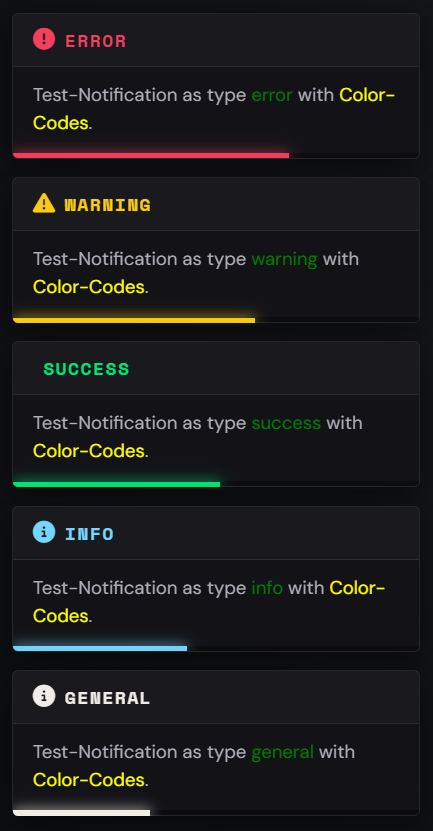
MSK.Notification
Displays a notification to the player using the configured Config.Notification backend. Also available as the alias MSK.Notify, and can be triggered remotely via the msk_core:notification net event.
Parameters
title - string - The title of the notification (used by the msk, okok and custom backends)
message - string - The message body
typ - string - Optional - Default: 'info' - One of the keys defined in Config.NotifyTypes (general, info, success, warning, error)
duration - number - Optional - Default: 5000 - Display duration in milliseconds
MSK.Notification(title, message, typ, duration)

-- Example
MSK.Notification('MSK Scripts', 'You ~g~successfully~s~ saved your vehicle!', 'success', 5000)

-- As an Export:
exports.msk_core:Notification(title, message, typ, duration)
MSK.HelpNotification
Shows a help notification. With the msk backend it uses the MSK TextUI; with the native backend it shows the GTA help text. Also available as the alias MSK.HelpNotify, and can be triggered remotely via the msk_core:helpNotification net event.
Parameters
text - string - The help text to display
key - string - Optional - A unique key used by the MSK TextUI backend to identify this help notification
MSK.HelpNotification(text, key)

-- Example
MSK.HelpNotification('Press ~INPUT_CONTEXT~ to open the garage', 'garage_help')

-- As an Export:
exports.msk_core:HelpNotification(text, key)
MSK.AdvancedNotification
Shows an advanced (picture/character) notification using the configured Config.AdvancedNotification backend. Also available as the alias MSK.AdvancedNotify, and can be triggered remotely via the msk_core:advancedNotification net event.
Parameters
text - string - The message body
title - string - The title shown above the message
subtitle - string - The subtitle shown below the title
icon - string - Optional - Default: 'CHAR_HUMANDEFAULT' - The character/picture texture name
flash - boolean - Optional - Default: true - Whether the notification flashes
icontype - number - Optional - Default: 1 - The icon type id
MSK.AdvancedNotification(text, title, subtitle, icon, flash, icontype)

-- Example
MSK.AdvancedNotification('Your bill has been paid.', 'Bank', 'Maze Bank', 'CHAR_BANK_MAZE', true, 1)

-- As an Export:
exports.msk_core:AdvancedNotification(text, title, subtitle, icon, flash, icontype)
MSK.Subtitle
Prints a subtitle at the bottom of the screen (native BeginTextCommandPrint). Can be triggered remotely via the msk_core:subtitle net event.
Parameters
text - string - The subtitle text
duration - number - Optional - Default: 8000 - Display duration in milliseconds
MSK.Subtitle(text, duration)

-- Example
MSK.Subtitle('~y~Mission failed.', 5000)

-- As an Export:
exports.msk_core:Subtitle(text, duration)
MSK.Spinner
Shows a loading busy spinner with text for a given duration, then turns it off automatically. Can be triggered remotely via the msk_core:spinner net event.
Parameters
text - string - The text shown next to the spinner
typ - number - Optional - Default: 4 - Spinner type (4 = orange, 5 = white)
duration - number - Optional - Default: 5000 - How long the spinner is shown in milliseconds
MSK.Spinner(text, typ, duration)

-- Example
MSK.Spinner('Saving...', 4, 3000)

-- As an Export:
exports.msk_core:Spinner(text, typ, duration)
MSK.Draw3DText
Draws text in the 3D world at the given coordinates, scaling automatically with the distance to the camera. Must be called every frame (e.g. inside a render thread). Can be triggered remotely via the msk_core:draw3DText net event.
Parameters
coords - vector3 / table - The world coordinates to draw the text at (accepts a vector3 or a table with x, y, z)
text - string - The text to draw
size - number - Optional - Default: 1 - The base scale of the text
font - number - Optional - Default: 0 - The font id
MSK.Draw3DText(coords, text, size, font)

-- Example
CreateThread(function()
    while true do
        MSK.Draw3DText(vector3(215.5, -810.2, 30.7), 'Press ~g~E~s~ to interact', 1, 0)
        Wait(0)
    end
end)

-- As an Export:
exports.msk_core:Draw3DText(coords, text, size, font)
MSK.DrawGenericText
Draws 2D text on the screen at a configurable position. Must be called every frame. Can be triggered remotely via the msk_core:drawGenericText net event.
Parameters
text - string - The text to draw
outline - boolean - Optional - Whether to draw a text outline
font - number - Optional - Default: 0 - The font id
size - number - Optional - Default: 0.34 - The text scale
color - table - Optional - Default: {r = 255, g = 255, b = 255, a = 255} - The text color
position - table - Optional - Default: {width = 0.50, height = 0.90} - The screen position (width = x, height = y)
MSK.DrawGenericText(text, outline, font, size, color, position)

-- Example
CreateThread(function()
    while true do
        MSK.DrawGenericText('Welcome to the City', true, 0, 0.4, {r = 0, g = 230, b = 118, a = 255}, {width = 0.5, height = 0.85})
        Wait(0)
    end
end)

-- As an Export:
exports.msk_core:DrawGenericText(text, outline, font, size, color, position)