Notify
Client-side notification and HUD text helpers. The notification functions route through configurable backends, so the same MSK.* call works regardless of which notification system your server uses.
The backend for each function is selected in config.lua:
Config.Notification(msk/native/custom/okok/qb-core/bulletin): backend forMSK.Notification.Config.AdvancedNotification(native/custom/bulletin): backend forMSK.AdvancedNotification.Config.HelpNotification(msk/native/custom): backend forMSK.HelpNotification.Config.NotifyTypes: defines the icon and color for each notify type when themskbackend is used.
When using the msk (or native) backend you can embed GTA color codes such as ~g~ (green), ~r~ (red) or ~b~ (blue) directly in your text.
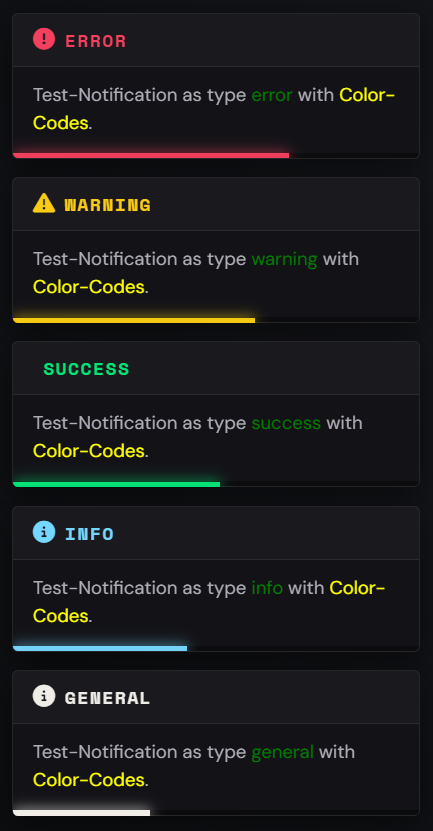
MSK.Notification
Displays a notification to the player using the configured Config.Notification backend. Also available as the alias MSK.Notify, and can be triggered remotely via the msk_core:notification net event.
Parameters
data - table - Notification data
Description
- message -
string- The message body (descriptionworks as well) - title -
string- Optional - The title. Without a title the notification is shown in a compact form, with the icon next to the text - type -
string- Optional - Default:'info'- One of the keys defined inConfig.NotifyTypes(general,info,success,warning,error) - duration -
number- Optional - Default:5000- Display duration in milliseconds - id -
string- Optional - A visible notification with the same id is updated and its time restarts, instead of stacking a second one - icon -
string- Optional - FontAwesome icon, overrides the icon of the type. Short name (car) or full class (fas fa-car) - iconColor -
string- Optional - Color of the icon, default is the color of the type - iconAnimation -
string- Optional -spin,spinPulse,spinReverse,beat,beatFade,bounce,fade,flip,shake - position -
string- Optional -top-left,top,top-right,center-left,center-right,bottom-left,bottom,bottom-right - showDuration -
boolean- Optional - Default:true-falsehides the progress bar - sound -
boolean/table- Optional - Default:true-falseis silent,{ bank = ..., set = ..., name = ... }plays a GTA sound instead of the MSK sound (bankis optional)
Everything beyond title, message, type and duration only applies to the msk backend. The other backends get what they understand, and Config.customNotification receives the whole data table as fifth parameter.
Players can pick their own notification position in the settings menu. That choice always wins over position. The position from your script is only used while the player's setting is "Automatic", and without either one notifications appear top left. A player who turned the notification sound off hears neither the MSK sound nor a GTA sound.
MSK.Notification(data)

-- Example
MSK.Notification({
    title = 'Garage',
    message = 'You ~g~successfully~s~ saved your vehicle!',
    type = 'success',
    duration = 5000,
})

-- Compact, without a title, updated in place while it is visible
MSK.Notification({
    id = 'garage_full',
    message = 'Your garage is ~r~full~s~.',
    type = 'error',
    icon = 'warehouse',
    iconAnimation = 'shake',
    position = 'top-right',
    sound = { set = 'HUD_FRONTEND_DEFAULT_SOUNDSET', name = 'ERROR' },
})

-- As an Export:
exports.msk_core:Notification(data)
The old form MSK.Notification(title, message, typ, duration) still works, but is deprecated and logs a warning once per resource. Pass a table instead:
MSK.Notification({ title = 'MSK Scripts', message = 'Saved!', type = 'success', duration = 5000 })
MSK.HelpNotification
Shows a help notification. With the msk backend it uses the MSK TextUI; with the native backend it shows the GTA help text. Also available as the alias MSK.HelpNotify, and can be triggered remotely via the msk_core:helpNotification net event.
Parameters
text - string - The help text to display
key - string - Optional - A unique key used by the MSK TextUI backend to identify this help notification
MSK.HelpNotification(text, key)

-- Example
MSK.HelpNotification('Press ~INPUT_CONTEXT~ to open the garage', 'garage_help')

-- As an Export:
exports.msk_core:HelpNotification(text, key)
MSK.AdvancedNotification
Shows an advanced (picture/character) notification using the configured Config.AdvancedNotification backend. Also available as the alias MSK.AdvancedNotify, and can be triggered remotely via the msk_core:advancedNotification net event.
Parameters
text - string - The message body
title - string - The title shown above the message
subtitle - string - The subtitle shown below the title
icon - string - Optional - Default: 'CHAR_HUMANDEFAULT' - The character/picture texture name
flash - boolean - Optional - Default: true - Whether the notification flashes
icontype - number - Optional - Default: 1 - The icon type id
MSK.AdvancedNotification(text, title, subtitle, icon, flash, icontype)

-- Example
MSK.AdvancedNotification('Your bill has been paid.', 'Bank', 'Maze Bank', 'CHAR_BANK_MAZE', true, 1)

-- As an Export:
exports.msk_core:AdvancedNotification(text, title, subtitle, icon, flash, icontype)
MSK.Subtitle
Prints a subtitle at the bottom of the screen (native BeginTextCommandPrint). Can be triggered remotely via the msk_core:subtitle net event.
Parameters
text - string - The subtitle text
duration - number - Optional - Default: 8000 - Display duration in milliseconds
MSK.Subtitle(text, duration)

-- Example
MSK.Subtitle('~y~Mission failed.', 5000)

-- As an Export:
exports.msk_core:Subtitle(text, duration)
MSK.Spinner
Shows a loading busy spinner with text for a given duration, then turns it off automatically. Can be triggered remotely via the msk_core:spinner net event.
Parameters
text - string - The text shown next to the spinner
typ - number - Optional - Default: 4 - Spinner type (4 = orange, 5 = white)
duration - number - Optional - Default: 5000 - How long the spinner is shown in milliseconds
MSK.Spinner(text, typ, duration)

-- Example
MSK.Spinner('Saving...', 4, 3000)

-- As an Export:
exports.msk_core:Spinner(text, typ, duration)
MSK.Draw3DText
Draws text in the 3D world at the given coordinates, scaling automatically with the distance to the camera. Must be called every frame (e.g. inside a render thread). Can be triggered remotely via the msk_core:draw3DText net event.
Parameters
coords - vector3 / table - The world coordinates to draw the text at (accepts a vector3 or a table with x, y, z)
text - string - The text to draw
size - number - Optional - Default: 1 - The base scale of the text
font - number - Optional - Default: 0 - The font id
MSK.Draw3DText(coords, text, size, font)

-- Example
CreateThread(function()
    while true do
        MSK.Draw3DText(vector3(215.5, -810.2, 30.7), 'Press ~g~E~s~ to interact', 1, 0)
        Wait(0)
    end
end)

-- As an Export:
exports.msk_core:Draw3DText(coords, text, size, font)
MSK.DrawGenericText
Draws 2D text on the screen at a configurable position. Must be called every frame. Can be triggered remotely via the msk_core:drawGenericText net event.
Parameters
text - string - The text to draw
outline - boolean - Optional - Whether to draw a text outline
font - number - Optional - Default: 0 - The font id
size - number - Optional - Default: 0.34 - The text scale
color - table - Optional - Default: {r = 255, g = 255, b = 255, a = 255} - The text color
position - table - Optional - Default: {width = 0.50, height = 0.90} - The screen position (width = x, height = y)
MSK.DrawGenericText(text, outline, font, size, color, position)

-- Example
CreateThread(function()
    while true do
        MSK.DrawGenericText('Welcome to the City', true, 0, 0.4, {r = 0, g = 230, b = 118, a = 255}, {width = 0.5, height = 0.85})
        Wait(0)
    end
end)

-- As an Export:
exports.msk_core:DrawGenericText(text, outline, font, size, color, position)